
Learn about the benefits of using resource planning software tools and pick the best one for your business.

Ask yourself: could someone new to the team understand your resourcing picture in under five minutes? If not, you’re probably due an upgrade.
Resource planning is complex without the right software.
For every resource, there are a whole lot of variables that you have to account for. When they are brought together in a project plan, it can get overwhelming.
Fortunately, the old days of managing resources in a spreadsheet are numbered. Error-prone, time-wasting manual resource management is becoming a thing of the past.
Resource planning tools do a lot of the heavy lifting for you. Updates carry through to other relevant reports, and budget and timeline management is automated. Resource planning becomes easier, faster, and more reliable.
But how do you choose the best resource planning software? It can be difficult to understand what kind of resource planning tool you actually need. Do you need something high-level, something deeply detailed, or something that connects to the tools you already use? The right answer depends heavily on whether your team is project-driven or task-driven.
Keep this in mind as you read through this article, which analyzes the strengths of different resource planning tools so you can pick the one that’s best suited to your needs.
In this article:
Resource planning software is a tool that helps you manage and allocate resources to projects. That includes staff, money, equipment, technology and all manner of other assets in resource management.
You can use it for:
All of these functions involve a lot of work. Some of these will be more relevant to you than others, so it helps to be able to find a resource planning tool that’s great at the things you actually need.
Once you get the best resource planning software for your needs, you’ll save time and cut costs by finding efficiencies in your processes. You can also get greater return on the money you’ve invested in your people by utilizing them more effectively. Rather than having a highly paid staff member working on tasks that are below their pay grade, you can ensure they’re assigned to higher-value jobs.
These are just some of the benefits of resource planning software.
What would break first if your headcount doubled this year – your resourcing model, your spreadsheets, or your people?
For those new to project management, or even if you’ve been doing it manually for a while, spreadsheets seem an obvious way to manage resource planning.
But purpose-built resource planning software has some clear advantages:
These are just some of the advantages of resource scheduling and planning software over spreadsheets, and they can make a significant difference to your job as a project manager or resource manager.
Before we jump into the tool list, take a moment to consider what you actually need the software to be great at: high-level people-to-project planning, detailed task management, or deeper project operations.
If you’re not sure what category you fit into yet, consider what you need to know first when a new project lands.
With that in mind, here are some of the best resource planning tools available in 2026.
Runn comes with a range of free resource planning tools to help managers see their team’s resource capacity, including skills and team capabilities. You get a bird’s-eye-view of all resources across multiple projects and can easily allocate people to the right work.
Unlike other resource management tools, Runn advocates high-level resource planning, so you allocate people to projects, not individual tasks. This is the preferred option for resource planning for agile businesses that want to understand the financial picture of their projects without being too deterministic about the project plan in the long term.
The advantage is clear: you can see how well resources are being utilized without drilling down into details, and quickly understand whether you have enough resources to deliver your pipeline. This knowledge helps you build teams with the most critical skills and align your hiring with real demand.
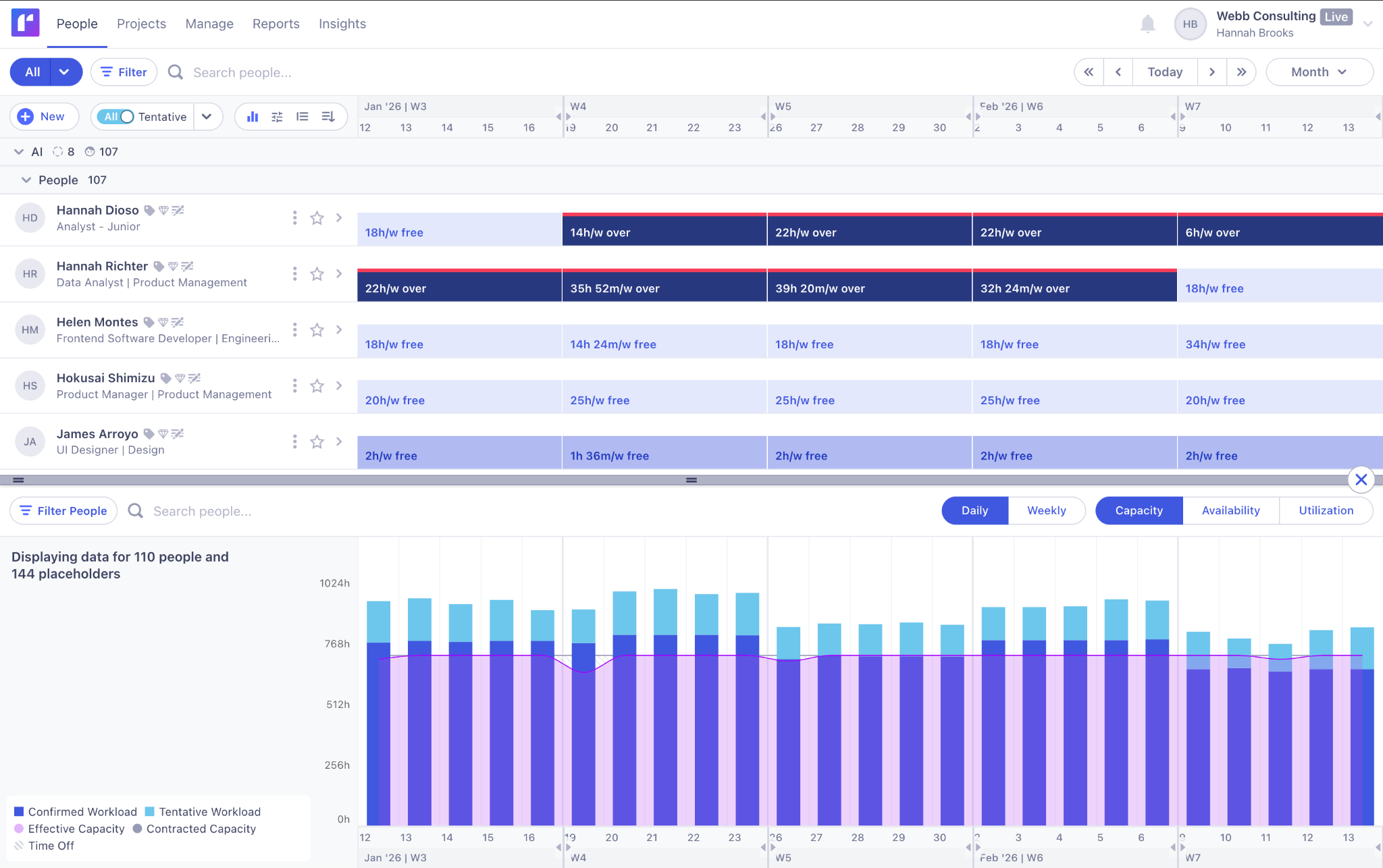
Runn is especially strong for custom software, IT services, and consulting firms that need to see capacity, margins, and skills across multiple client projects in real time without dropping into task-level chaos.
This is often where teams start asking what a good resource plan actually looks like for a services business. With Runn, it’s less about creating perfect task lists and more about understanding capacity, roles, skills, and margin drivers at a glance – the things that actually determine whether a project succeeds.
Runn's new Insights feature lets you access high-level utilization data, with dynamic reporting that surfaces the information you need to predict whether their projects are on budget and when course corrections are needed.
Another benefit of using Runn for resource planning is the ability to set up confirmed and tentative projects to plan with future resource availability in mind. If you don’t have people with the right skills, you can use placeholders and make intelligent hiring decisions well in advance.
The People Planner is user-friendly and highly visual, with drag-and-drop allocation. Benefit from helpful insights insight resource capacity, availability, workload, project variance, and clashes.
You can also get instant feedback with project tracking and timesheets to understand how a project really ran compared to your plans. This means you can adjust your planning for next time, including optimizing your team.
Here’s what one user had to say about their experience with Runn:
Powerful and feature rich, yet easy to understand and set up. Modeling my team, projects, and resourcing took a remarkably short time and prompted one or two very good questions I hadn't considered.
Read more: Why Custom Software and IT Solutions Teams Choose Runn for Resource Planning ➡️
Forecast is an end-to-end resource planning tool for allocating, scheduling, and monitoring resources. The combination of project management features with task management, time tracking, and project accounting makes it an ideal replacement for traditional dispersed tools for professional services firms.
Forecast was acquired by Accelo in 2024 and now powers parts of Accelo’s PSA platform, but the standalone Forecast product continues to operate with its original feature set.
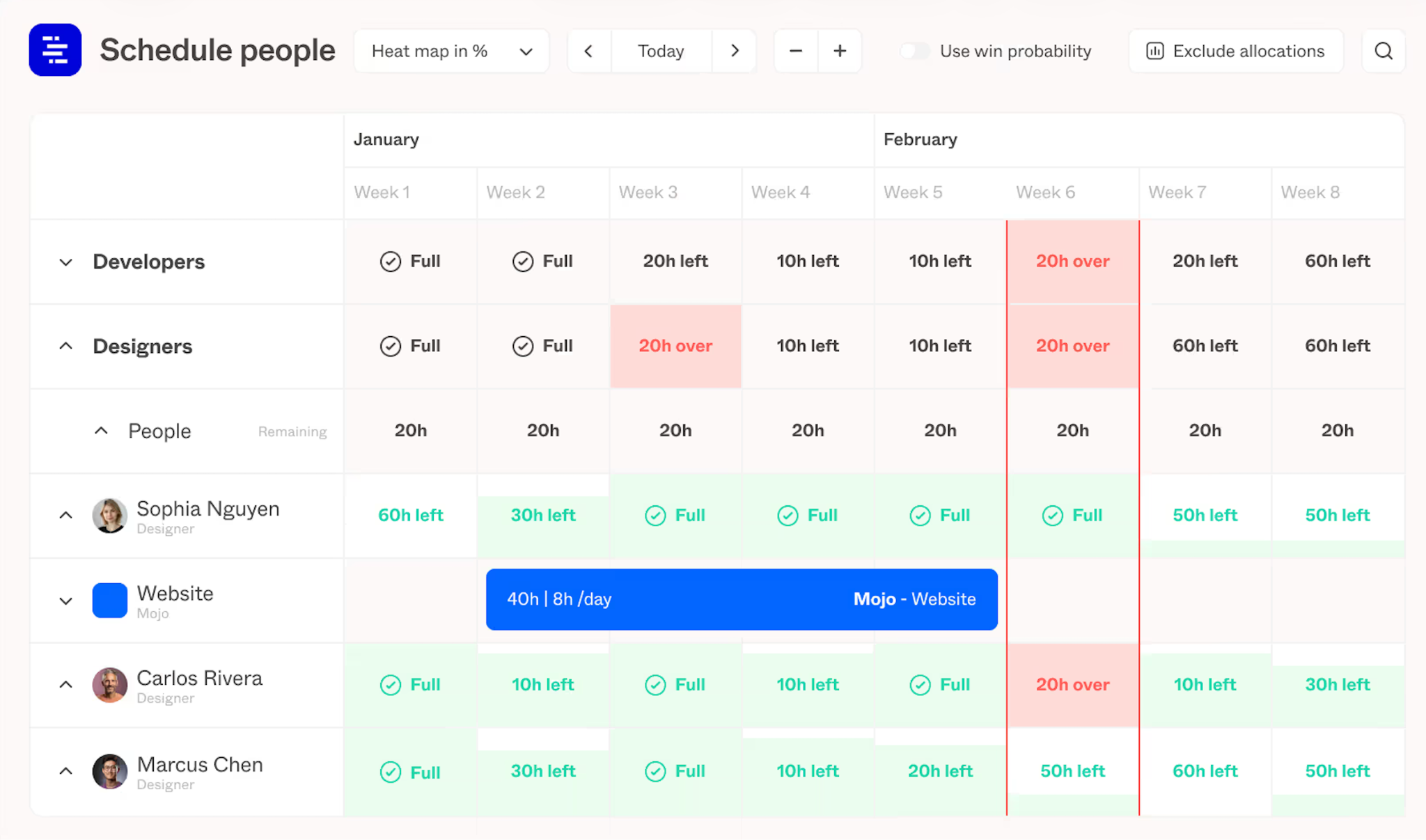
Forecast was designed to accommodate both long-term and short-term resource planning. You may assign resources to tasks or projects and obtain a comprehensive picture of all resource indicators for each team member now and in the future – their allocations, workloads, utilization rates, and time off.
This platform is popular among agencies that want to get granular with their planning because they get most requirements from customers upfront.
With Forecast we are easily able to plan our architectural projects, meet deadlines, and stay within the allotted budgets. Forecast is consistently updating with new features and add-ons.
Professional services project managers have specific requirements, and these align nicely with what Smartsheet provides.
Resource Management by Smartsheet is an add-on that complements Smartsheet’s core platform. It emphasises native integration between project plans and resource data, so changes in tasks can automatically update capacity and hiring forecasts.
One standout feature is the helpful matching tool that provides efficient resource allocation based on a range of factors. You can set criteria to identify the best person for a job based on their team, skills, availability and more.
These filters can also be used to get specific project data, including historical data, at the click of a button. Having information and reports easily accessible is a big help to project managers who are using resource planning software to run large projects, or manage a lot of information.
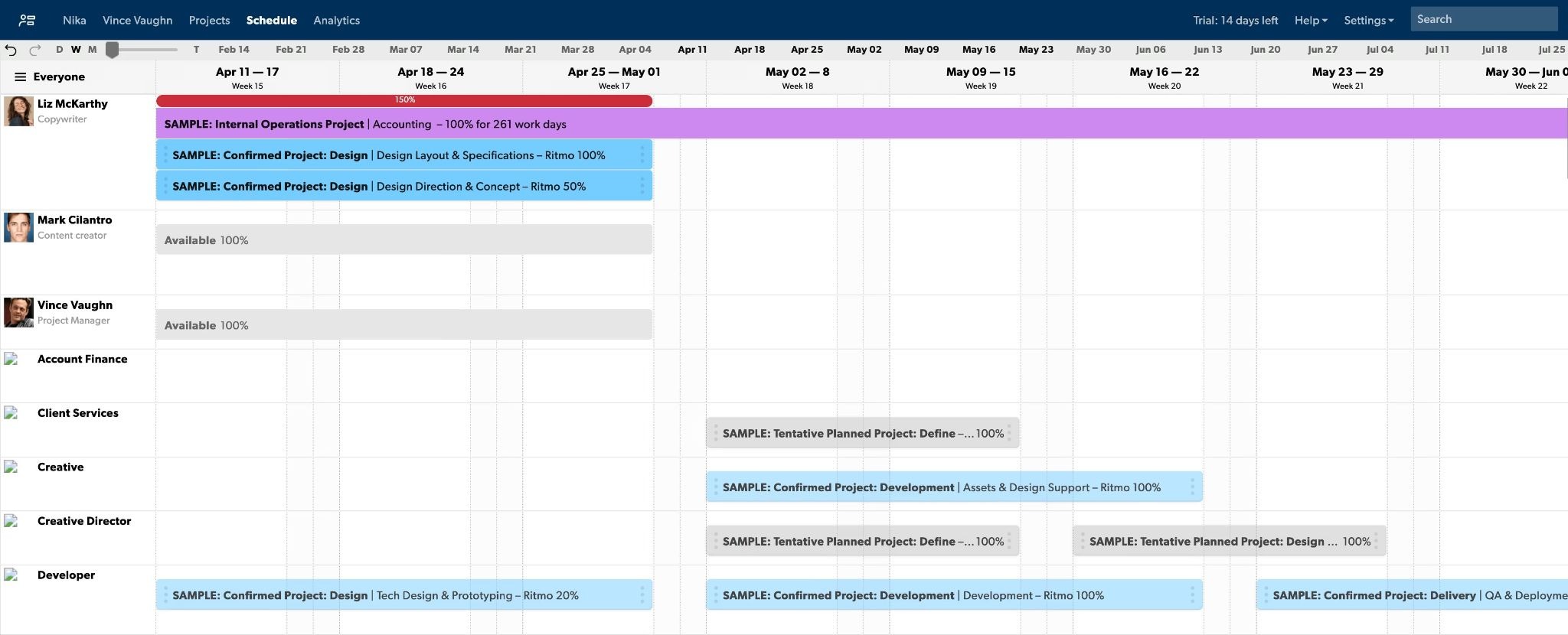
Smartsheet also makes it easy to monitor and track teams through built-in timesheets, mobile time functions and expense tracking. You can see resource utilization figures, get time reports against reality and map future projects to ensure they align with resource availability.
We have been able to bring huge teams together with so much more ease by using Smartsheet. People of all skill sets can leverage the tracking tools available, making it easy for any PM to track their project(s).
monday.com uses a simple design and clear interface to help users get the insight and information they need without too much fuss. It’s flexible and intuitive, meaning teams can communicate seamlessly – including with its integrations on more than 40 other platforms such as Slack, the Google suite, Trello, Dropbox and more.
Users get overall visibility over their projects, resource availability and project timelines, while also being able to drill down into specific pieces of work or a single resource to understand their productivity.
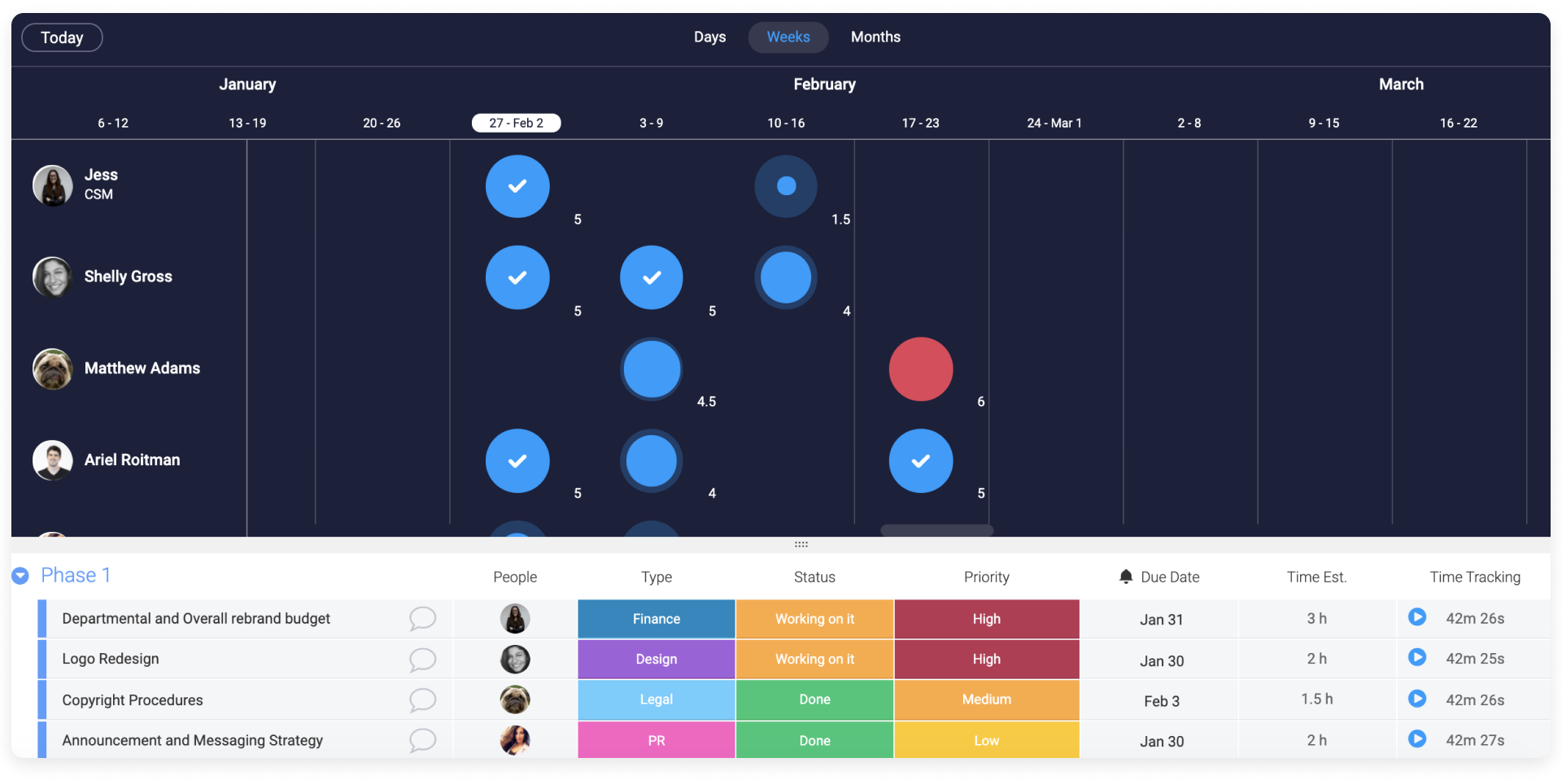
monday.com can also be personalized to the user, so different people can get different views based on their preferences. Another aspect that makes it easy to use is how it can be used to organize a number of things in one place. Daily to-do lists, project management and team allocation is all done with one tool. Again, being able to integrate with other software realizes even more benefits.
Monday.com gives us the freedom to build online tools to manage all daily tasks in our business. The versatility makes it our weapon of choice.
Do you value simplicity over depth? Float is the kind of tool you can adopt in an hour, if that’s your priority.
Float is a powerful resource planning software that can handle the needs of different organizations, agencies in particular. It’s used by a range of industry leaders such as Deloitte, Ogilvy, and Buzzfeed.
Simple scheduling allows users to create projects, assign tasks and allocate resources easily. A search and filter function helps to see projects, employees and resource details in isolation, and it also has visual, high-level reports that give an overall sense of business performance metrics.
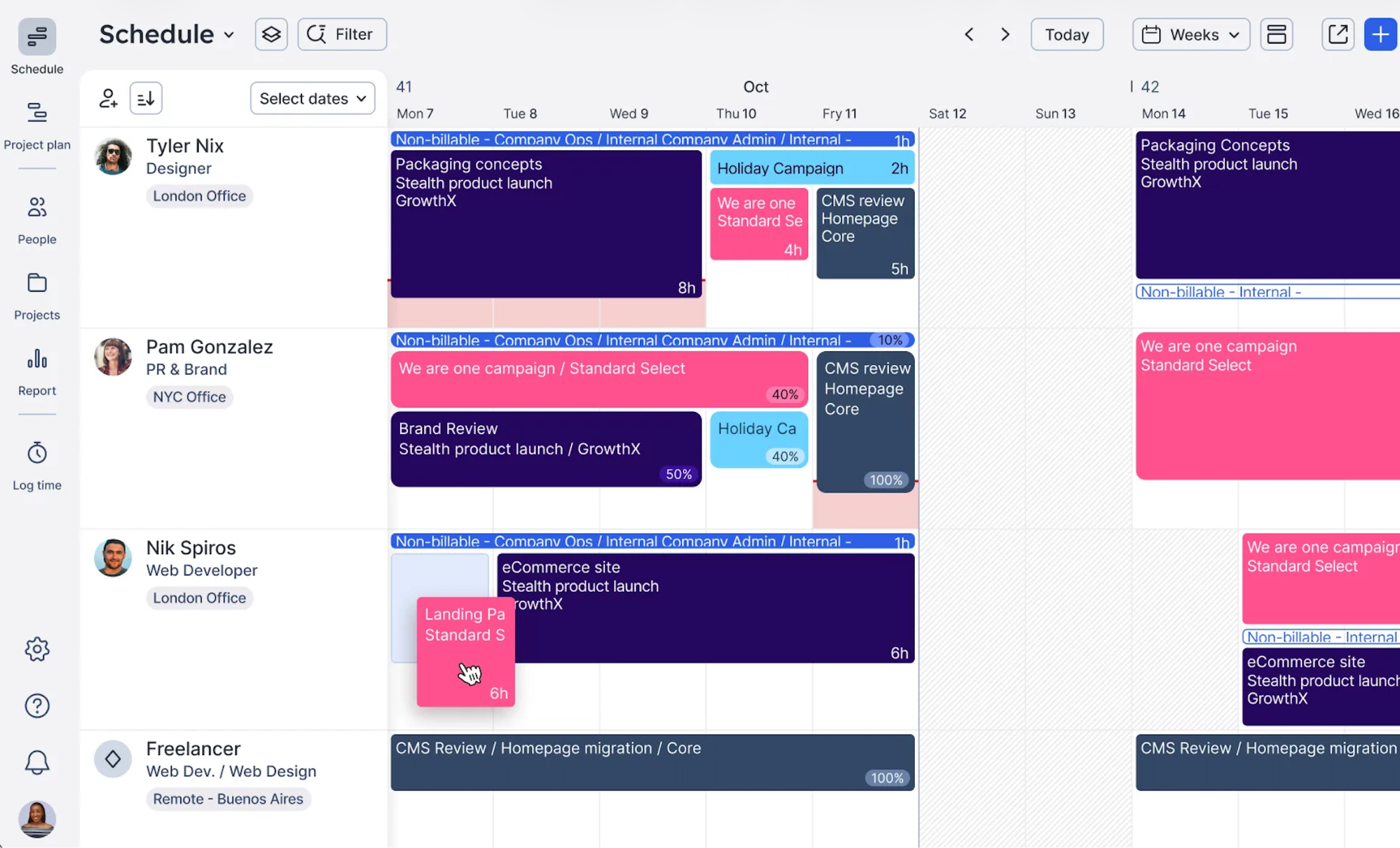
Real time reports give users visibility over resource utilization, budget tracking and capacity planning and forecasting. You can do all of this quickly, with a powerful interface that lends Float to businesses with a lot of users. In saying that, it can do all of this for small teams too.
Float also has a range of customizable features, such as personalized work hours, local public holidays, and custom tags such as staff locations and skills. Team members can update their own statuses to reflect if they’re working from home, and showcase the tasks they’re working on without having to check in with managers.
It's a great app that helps us every single day to simply and effectively manage resources without the process becoming a chore.
Read on: Runn vs Float - Putting the Best in Resource Planning to Test ➡️
ClickUp brings your company assets, time tracking capabilities and form management into a single place, aiming to provide easy resource allocation for all staff. Anyone can work on anything, meaning you can get on with making the progress you need to without having to wait.
ClickUp comes integrated with docs, reminders, goals, calendars, schedules and email – all the things you need to plan, organize and collaborate on your project in one place. Features and displays are customizable for each employee, helping all staff to realize its benefits.

ClickUp’s workload view and capacity dashboards make it possible to do basic resource planning without leaving ClickUp, which is especially handy if your tasks already live there.
ClickUp also allows users to collect information from vendors and stakeholders in customizable, engaging forms. You can quickly collate responses in visual reports to help you compare information on your costs, calculations, inventories and more.
Wondering whether task tools can truly replace dedicated resource planners? The honest answer is that they can handle light capacity planning, but they rarely model financials, skills, scenarios, or hiring needs, which becomes more noticeable as your team scales.
Very easy to learn, lots of help available through the software. Also easy to find tutorials online. Very customizable and beginner friendly for a lot of industries.
Polaris claims its customers see at least a 10 percent increase in resource utilization. That means saving costs and getting a better return on investment from your resources.
If you’re wondering how to utilize resources better, Polaris may be a good option. One of the key ways it helps to do this is through its intuitive SmartMatch feature. It’s an AI resource recommendation tool that suggests the best resource to perform a certain task based on a range of criteria such as availability, skills, rate, location and more.
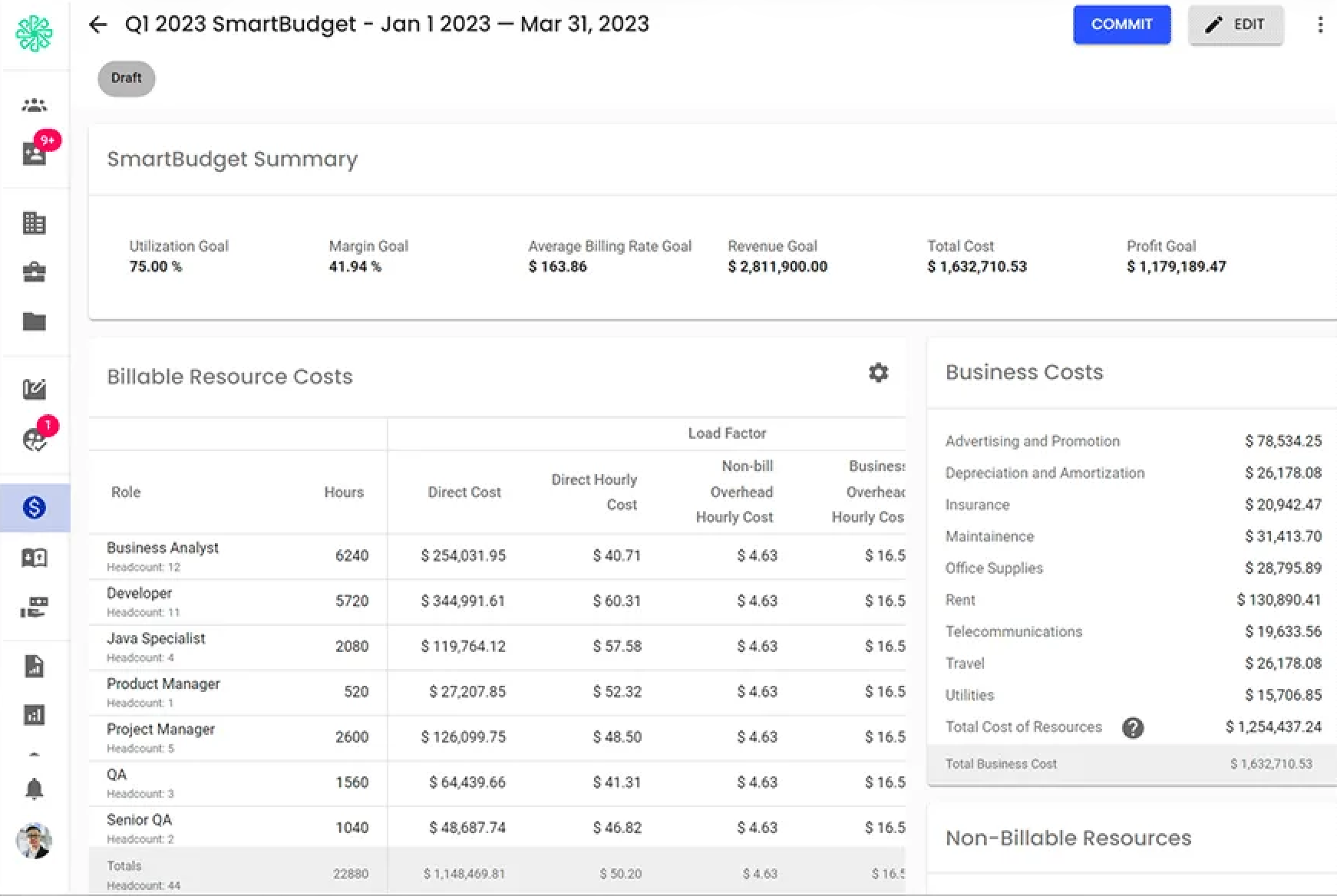
Polaris’ centralized resource management function helps to get the most of your resources by ensuring they’re being put to good use, doing the type of work they’re best suited to.
Drag-and-drop functionality is a real help allocating resources quickly and easily too.
It can also help you to grow your human resource capabilities. Users can track employees’ skills, qualifications and expertise to foster centralized skill development and good succession planning.
We solved several problems by eliminating manual rekeying of the payroll hours and expense reports. Improved the quality of the data by having the employees enter their own information. Improved the timeliness of when payroll processing takes place. Better documented workflows. Improved employee satisfaction.
Kantata (formerly Mavenlink) is not only about project planning – it incorporates accounting, business intelligence and team collaboration functions, among others. It has a lot of features, but they’re easy to learn and it doesn’t feel overwhelming.
In particular, Kantata’s in depth accounting capabilities help to deliver the greatest benefits from your resources. Manage project costs, budgets and invoicing, and keep your rate cards in the same place as your resource utilization and margin tracking. All of these accounting systems integrate into specialist financial software.
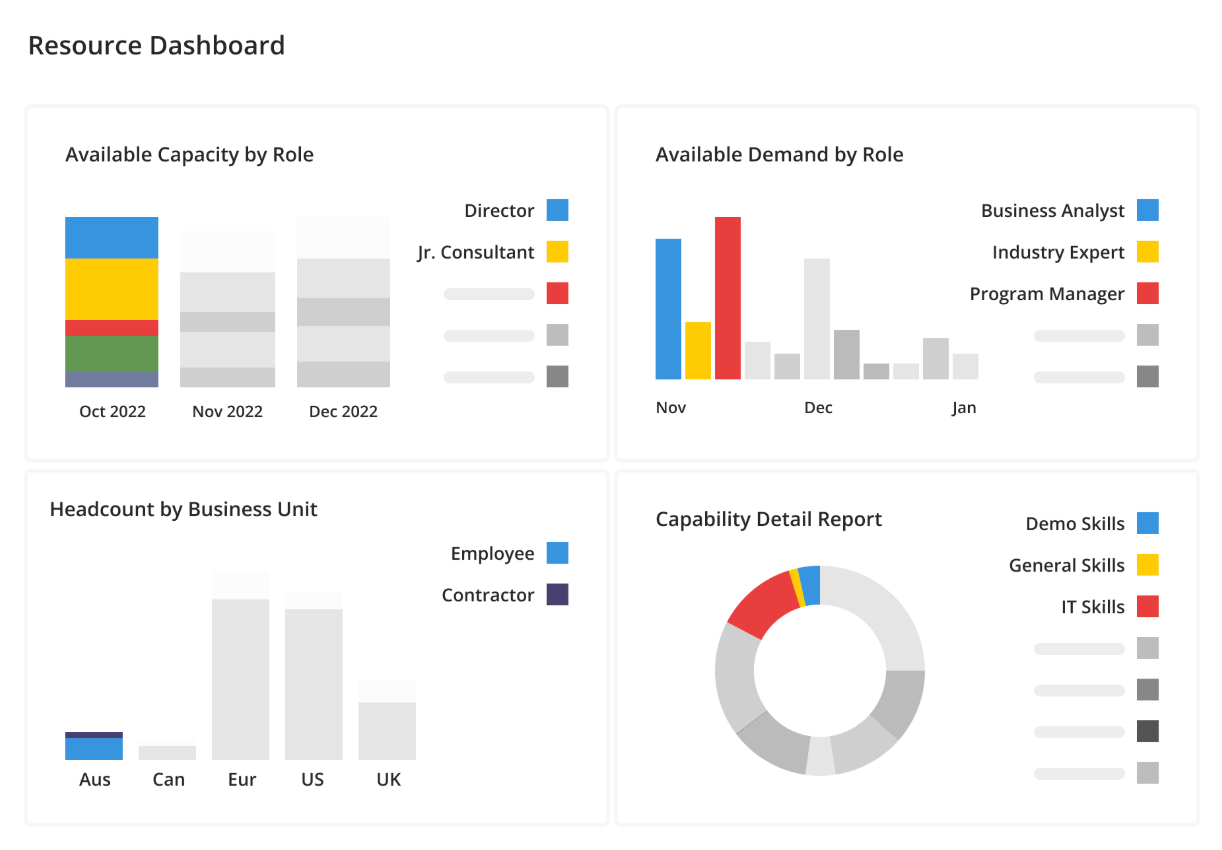
Kantata takes a novel approach to integrations that makes it universally compatible with all other business tools you might use. Its API first strategy means it doesn’t need a third party to integrate with other tools – its M-Bridge function customizes integrations with any software you’re using. As well as that, it has pre-built integrations with a range of popular tools such as Expensify, Xero, Salesforce, Hubspot and more.
Documentation and project tracking is made easy through a minimalist, visual design that helps to bring your resource planning and utilization to life. It comes with a range of different dashboards for great real-time project visibility across different aspects.
The biggest problems that Mavenlink has solved for us would be the ability to see if our projects are profitable or not as well as saving us valuable time with some automation features like repeating tasks, having templates, etc.
Celoxis combines traditional PM strengths (Gantt, resource planning, reporting) with AI-assisted insights and stronger integrations into the rest of your tech stack.
Celoxis is a browser-based software with great visual, customizable dashboards and reporting options. It helps you to see and manage your resources, tasks and projects in a way that suits you and your team so you can collaborate and share insights and make decisions with confidence.
Celoxis’ group widgets are customizable, which makes for easy collaboration across teams and other stakeholders.
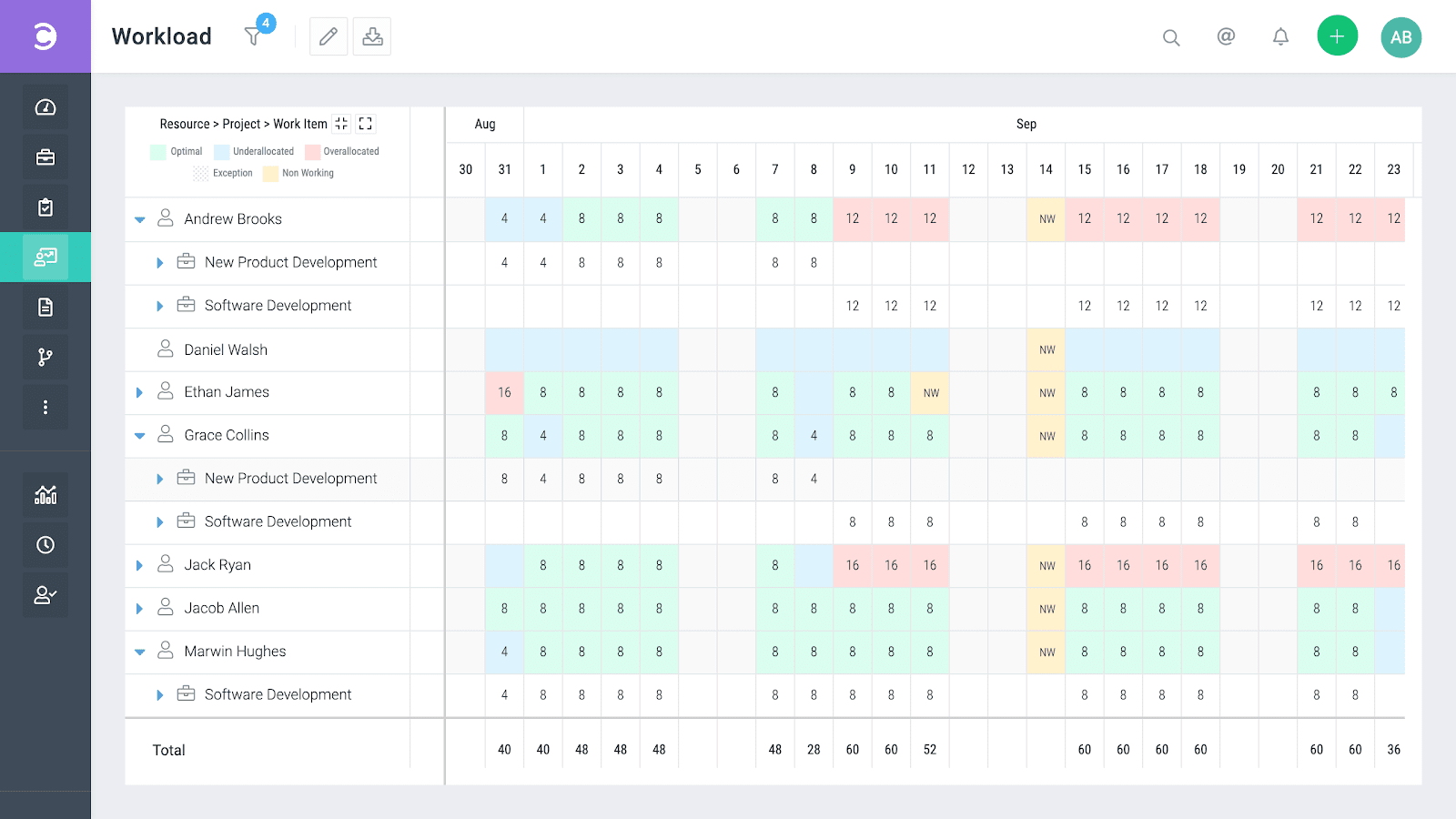
It also comes with features to help identify resource loading, resource utilization, resource capacity and resource efficiency. All of these real-time reports help to realize and unlock the benefits of resource planning software.
One complaint users have about Celoxis is it’s not always easy to build reports. This may come from having so many options to choose from – just look at the menu to see how much you can do. Resource planning also doesn’t have as much automation as other options, so it does require more effort in order to get the results you’re after.
Celoxis has really helped our business streamline processes and reporting. Time and task tracking is easier and more transparent to project managers and clients, and reporting is much less time intensive than our previous methods.
Resource Guru looks to make resource planning and project scheduling fast and simple, and it has a range of features to help:
All of these combine to make Resource Guru a really efficient resource planning software. You’ll improve resource utilization rates by getting more visibility over the productivity of each resource.
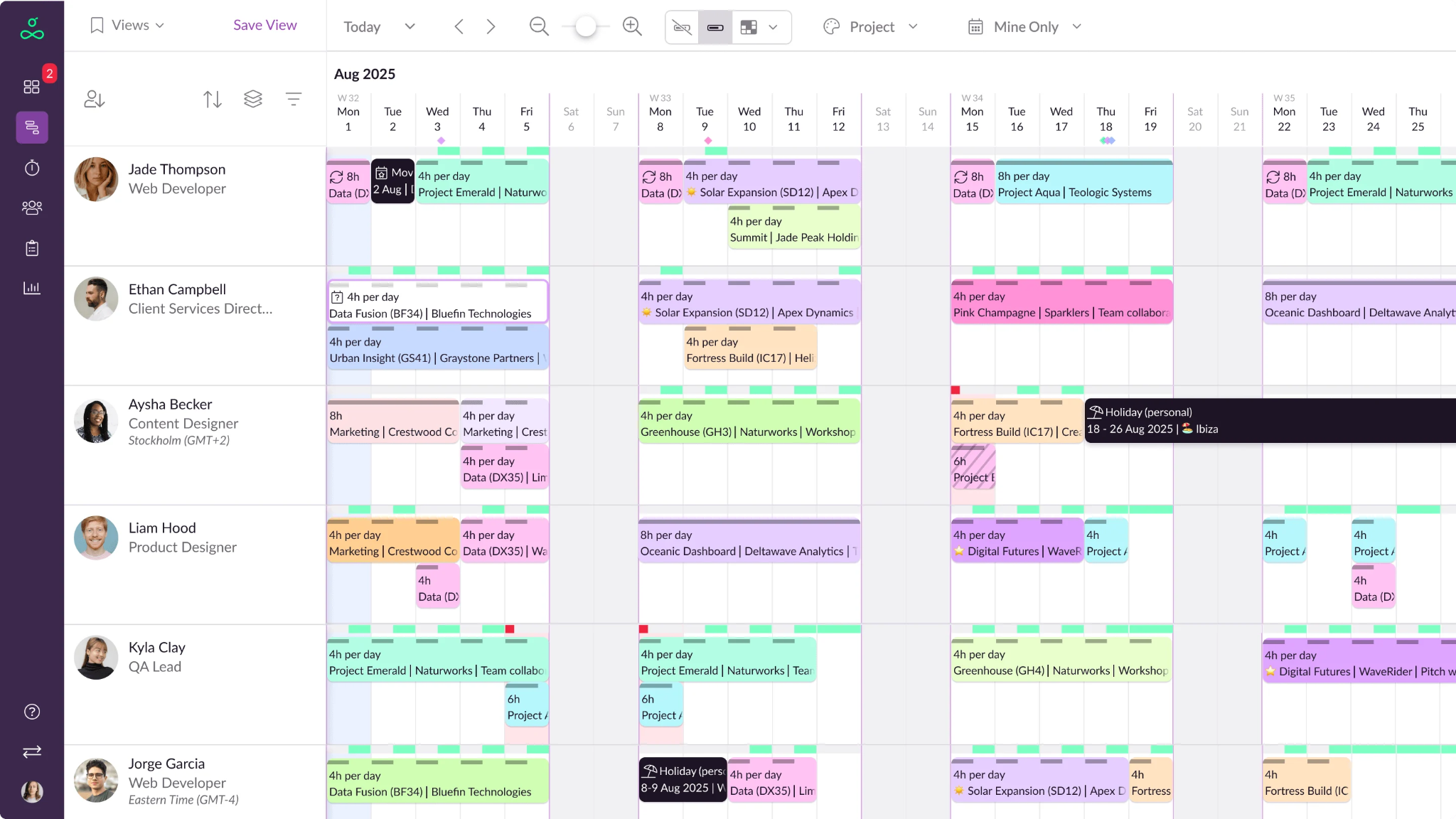
Engaging visual reports help to monitor each resource, and it’s particularly useful for human resource planning. Resource Guru’s waiting list is great for being able to tentatively schedule resources without overbooking. It’s easy to reverse bookings that you need to cancel, and daily schedules can be automated and emailed to staff each morning. You can also manage staff vacation, parental leave, sick days or any other type of time off in one place.
The ability to schedule out months at a time. Small projects do not get lost in the shuffle of construction projects that go on for months at a time where we are constantly pulling on and off. It is so easy to use and customize.

Teamdeck is an all-in-one resource management tool where you can do everything from team scheduling, time tracking, and timesheets creation to project planning, workload management, and availability management. But there is one feature here you don’t usually see in resource management tools – leave management, which means you can account not only for the hours when someone is available to work, but also when they are not.
The tool promises to simplify your resource management and optimization process with the help of API and integrations. Anything you need to manage the workload of your team, like Google Calendar Events, Slack channels, or Sage HR – all can easily get synched with Teamdeck.
Interestingly, the company proudly says that a lot of their customers replaced Mavenlink and Resource Guru with Teamdeck, mentioned above, which once again proves that all of these tools can take on complex project and resource management needs.
Here’s a quick overview of the things you can do in Teamdeck:
Teamdeck is a great choice for managing your team's workload and tracking your company's profitability.
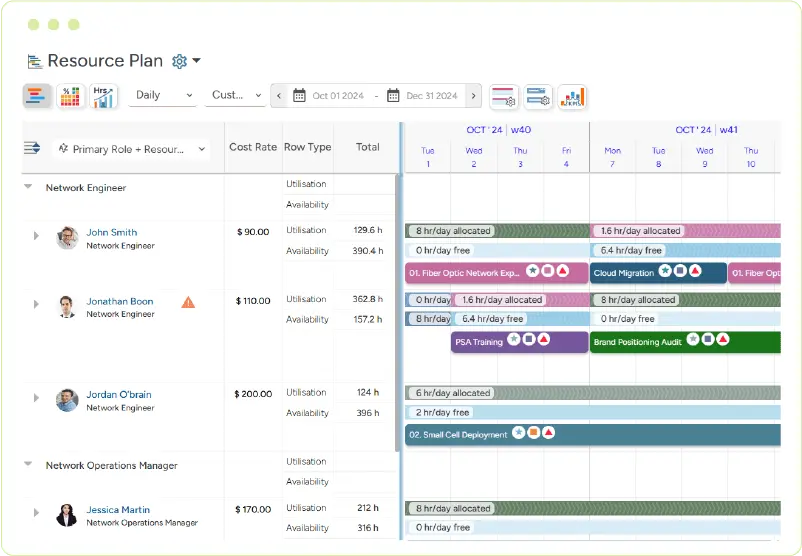
Saviom is the grand dame of resource planning tools – this well-established resource management tool has been around since 1999.
Saviom targets medium to large businesses in engineering, construction, professional services, IT, and government – and boasts many Fortune 500 businesses among its customers. Big-name users include Siemens, Fujitsu, and Konica Minolta.
Like most of the tools here, Saviom offers core resource management functionality to elevate and accelerate your resource planning processes, including
A resource scheduler and planner – including a central resource pool and drag-and-drop allocations into projects.Forecasting and capacity planning tools – such as utilization heatmaps that show opportunities to assign idle resources, and areas to target for recruitment.Project accounting tools – to automate, forecast and monitor project financials.Team collaboration tools – including in-app chat functionality. Real-time business intelligence – provided through data visualization, configurable dashboards, and in-depth reports.Integration with other tools – streamlining your software stack by syncing with HR, PM, and CRM tools.
Pricing is based on different license types – depending on the level of access different users need – from view only access to power licenses. This makes their plan highly customizable to your needs – but requires a tailored quote to know how much it’ll cost you.
Based on real user reviews in Capterra, here are some pros and cons of Saviom.
Product support was readily available and helpful. Provides great visibility of areas that need focus in terms of resource shortages and/or project prioritization.

Mosaic uses AI to auto-build resource plans, suggest the right people for each project, and highlight when you’ll need to hire, based on capacity and availability.
Mosaic includes project planning functionality that lets you quickly build project schedules and allocate resources to different phases. The color-coded Gantt chart view makes it easy to see different activities and their interdependencies.
The resource planning features are as you’d expect, providing centralized visibility into availability, capacity, and existing allocations. People can be drag-and-dropped into project plans, and their availability data will automatically update. You can see utilization rates to prevent over- and underutilization and balance workloads.
What’s really interesting is the use of AI and machine learning. Mosaic makes suggestions to improve project plans, team suggestions, and forecasts. It analyzes capacity, project plans, tasks, deadlines, and budgets to suggest the right projects for the right people, increasing utilization.
It also looks at workload demand for each role and compares it to current capacity. Then anticipates demand and alerts you when it’s time to hire.
Based on what users love in their Capterra reviews, here’s some pros and cons of Mosaic.
Platforms like Monday and Trello weren’t made for project-based companies that have decent turnover. Mosaic was made for creative agencies.

eResource Scheduler is designed for managing ALL organizational resources – human or otherwise. It lets you schedule booking for employees and contractors, as well as equipment and meeting rooms. This means it may have a broader audience than some of the other tools featured here – but it is still very applicable to managing human resources in project-based businesses.
Features of eResource Scheduler for resource planning include:
eResource Scheduler is modular, so you can buy what you need rather than paying a flat (and fat) monthly fee for features you don’t use. If you subscribe to all modules, it comes in at a mid-range price. Although it does not offer the same depth of functionality that many of the products here do. For example, there is no project planning module or invoicing functionality.
Based on real user reviews from Capterra, here are some eResource Scheduler pros and cons.
Since we started using E-Resource Scheduler, we know where our resources are allocated, what is the capacity, what is the utilization, and are able to take proper decisions.
In this article, we’ve covered some of the best resource planning software on the market right now for companies of all sizes. So how do you narrow it down?
When putting a resource planning system into place, the first step should be to select a tool that will improve your organization. As you weigh up your options, it’s worth considering how easily your team can adopt a new system, and whether it actually answers the questions that matter most for your projects and people.
For example, think about how smoothly you can transition from spreadsheets or fragmented tools. Does the software make it easy to import people, roles, working hours, and allocations? How quickly will your team trust the new source of truth?
Start by deciding the level of structure your team actually needs.
Another key factor is whether the tool helps you make smarter hiring decisions. Platforms like Runn compare future demand with role-based capacity and flag when a team or skill set will hit its limit, often weeks or months before it becomes a problem. That kind of forward visibility can transform how confidently you commit to new work.
Whether you’re a small company providing services to clients, or a larger corporation that tracks the needs and workload for numerous clients, resource planning software can make your day to day functions much easier and ultimately, save the day.
Ready to begin evaluating resource management software for your business, but not sure where to start? We invited Csaba Muha, Head of Governance and Operations, APAC, at Ollion, to share how his team navigated the process to find a scalable RM solution that supports real people, not just data:
Watch the full webinar here to get more wisdom from Csaba 🎥 ➡️


