
Explore Runn’s latest product updates and improvements.

Import and export Other Expenses using CSV. Update and upload new project other expenses in bulk or download existing project expenses to update records, migrate data, or work offline.
Whether you're migrating data, updating project costs, or maintaining financial records, working in bulk saves time. CSV import and export makes it faster to add new Other Expenses, update existing records, and work with your project expense data outside of Runn.
.png)
This update is available on all plans.
No action needed — this update will appear automatically. Check out our help doc for guidance on how to use this feature effectively.
Manage project expenses more efficiently. Upload new Other Expenses in bulk and download existing project expenses using CSV.
Placeholder demand can now be viewed in FTE with a new display mode in the People Planner. This makes it easier to see total demand for unassigned work in one place and group it by role, team, skills, project, and more for better planning.
Teams often need to plan for work that isn’t yet assigned, but it can be difficult to clearly see and quantify that demand. Viewing placeholder demand in FTE makes it easier to understand the scale of upcoming work, spot resourcing gaps early, and organize demand by role, team, skills, or project so you can make more informed hiring and allocation decisions.
Check out the tour for the Placeholder Demand (FTE) Display Mode here.
%20Runn.gif)
This update is available on all plans.
No action needed — this update will appear automatically. Check out our help doc for guidance on how to use this feature effectively.
Plan for unassigned work with clarity. The Placeholder Demand (FTE) Display Mode in the People Planner lets you see total placeholder demand in one place and group them by role, team, skills, project, and more.
Project details now open in a side panel from the Planner, so you can view and edit details, access actions, and navigate without leaving your current view.
Project details previously opened in the dashboard, which could take you out of your current view. Opening projects in a side panel keeps you in context, making it easier to quickly check and update details while continuing your planning workflow.
.gif)
This update is available on all plans.
No action needed — this update will appear automatically. Check out our help doc for guidance on how to use this feature effectively.
Stay in flow when viewing and editing projects. Project details now open in a side panel instead of the dashboard, so you can quickly view and update details without leaving the Planner.
The existing Project Planner view is now available as a display mode, so you can easily switch between Project Timeline and Phases & Milestones.
Having the Project Timeline as a dedicated display mode makes it easy to return to a familiar layout and switch between views depending on how you want to plan and manage your work.
.gif)
This update is available on all plans.
No action needed — this update will appear automatically. Check out our help doc for guidance on how to use this feature effectively.
Easily access the familiar Project Planner view. The existing Project Timeline is now available as a dedicated display mode, making it easy to switch between different ways of planning your work.
A new display mode in the Project Planner shows phases and milestones, letting you create and manage phases directly from a high-level view. This replaces the previous “Always show phases” advanced setting in the Planner.
Teams often use phases and milestones to structure project work. Having a dedicated display mode where they’re always visible makes them easier to find, and simplifies how you view, organize, and manage project phases.
This update is available on all plans.
No action needed — this update will appear automatically. Check out our help doc for guidance on how to use this feature effectively.
See project phases and milestones more easily. View and manage project phases directly in the Project Planner with a dedicated display mode.
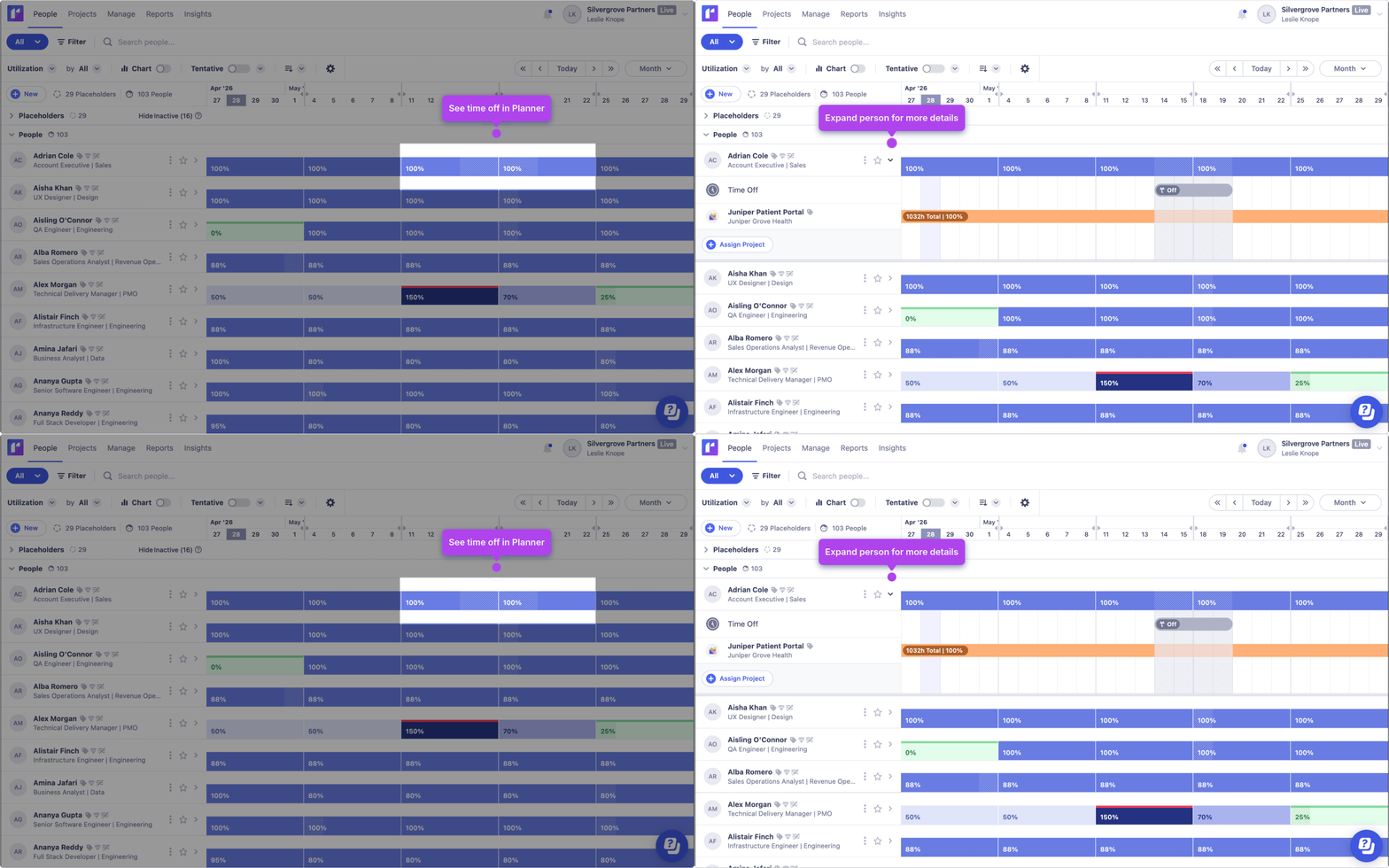
Time off is now shown directly on the person summary in the Planner, highlighting when someone is unavailable due to full-day scheduled leave, rostered days off, or public holidays.
When planning work, it’s important to understand availability at a glance. Showing time off directly in the person summary makes it easier to see when team members are taking time off and plan work accordingly.
This update is available on all plans.
No action needed — this update will appear automatically. Check out our help doc for guidance on how to use this feature effectively.
Quickly spot when people have time off. See full-day time off directly in the person summary so you can plan with better visibility.
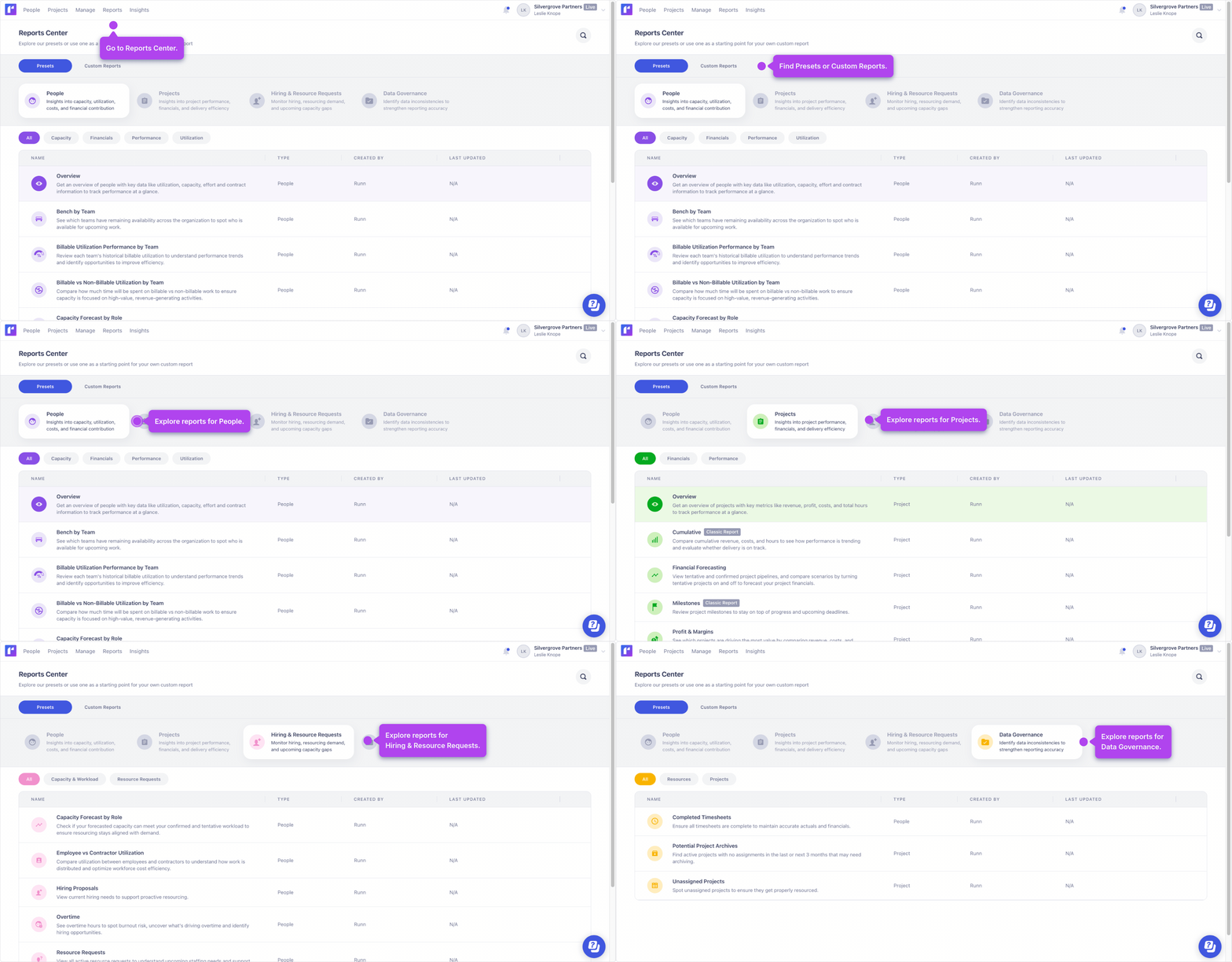
The refreshed Reports Center has a new layout that separates Preset Reports and Custom Reports, adds grouped navigation for preset reports across Projects, People, Hiring & Resource Requests, and Data Governance, and introduces more preset reports with descriptions and improved search. As part of this update, Classic Reports (Reports V1) is retired.
This refresh makes it easier to find the right report and understand what’s happening across your business. With clearer navigation and more preset reports, you can get started faster, answer common questions with confidence, and still customize reports to match the way your team works.
Check out the Product Tour for the new Reports Center here.
This update is available on all plans.
No action needed — this update will appear automatically. Check out our help doc for guidance on how to use this update effectively.
Make it easier to understand what’s happening across your business. The refreshed Reports Center adds clearer navigation and more preset reports to help you answer common questions with confidence.
The Planner now includes easier access to key tools (Grouping, Tentative toggle, Charts, Sorting), plus weekly availability/utilization summaries. The People Planner also adds display mode switching (Availability Hours/FTE, Utilization, Time Off) and new group-level availability summaries (by team, role, employment type, and more).
These improvements make it faster to see who has capacity and where teams are overbooked or underused. With better visibility, new summary views, and a bird’s-eye view, you can make resourcing decisions with more confidence and less manual effort.
Check out the Product Tour for the Refreshed Planner here.

This update is available on all plans.
No action needed — this update will appear automatically. Check out our help doc for guidance on how to use this update effectively.
Plan with more clarity and less effort. Quickly switch display modes, access key controls faster, and see availability summarized at the group level (by team, role, employment type, and more).

