
Optimizing resources in IT is about aligning work, skills, and capacity so that delivery is predictable, profitable, and humanly possible. Here’s how to do it.

If you run a software or IT delivery team, you’ve probably felt this tension: some people are overloaded, others are underutilized, and projects still slip.
Resource optimization fixes that. Done well, it improves delivery reliability, protects margins, and creates a more sustainable way of working.
Here’s how to do it.
Resource optimization in IT firms is about ensuring your people’s time is well spent. Imagine three scenarios for your lead developer. They could be:
The first scenario will deliver the best results for the business, whereas the last will deliver the least.
It requires the processes and visibility to ensure that every resource is working on the highest-value work.
That said, loading more work onto people won’t deliver better outcomes. That’s counterproductive and will cost you burned-out staff and high turnover.
In practice, this looks like assigning the right amount of work to the right people to improve IT project success rates.
If your team is busy but delivery still feels unpredictable, resource optimization is usually the missing piece.
In a custom software or IT business, the working time of your team members is your most valuable resource – and your highest cost. You need to use that time efficiently to deliver an optimal amount of billable project work.
Accurate resource allocation directly impacts delivery, margins, and team health.
👉 Read more: Why resource management is critical for project delivery success
Busy doesn’t equal productive or profitable. Utilization is a useful metric, but it’s just that. At its core, resource management looks to match people’s time and talent to the tasks that deserve them – at the time that they’re needed. And that boosts quality, engagement, productivity, and margins.
Resource optimization depends on one thing: knowing exactly how your people, projects, and capacity connect in real time.
When you can see that clearly, better decisions follow – who to assign, when to schedule work, and where to adjust before problems escalate.
Without that visibility, even experienced teams fall back on guesswork. And this can only go one way: missed deadlines, uneven workloads, and margin leakage.
Here’s how to build clarity into your day-to-day operations:
You can’t optimize what you can’t see. Lack of visibility is one of the top barriers to better resource management according to our State of Resource Management in 2026 report:
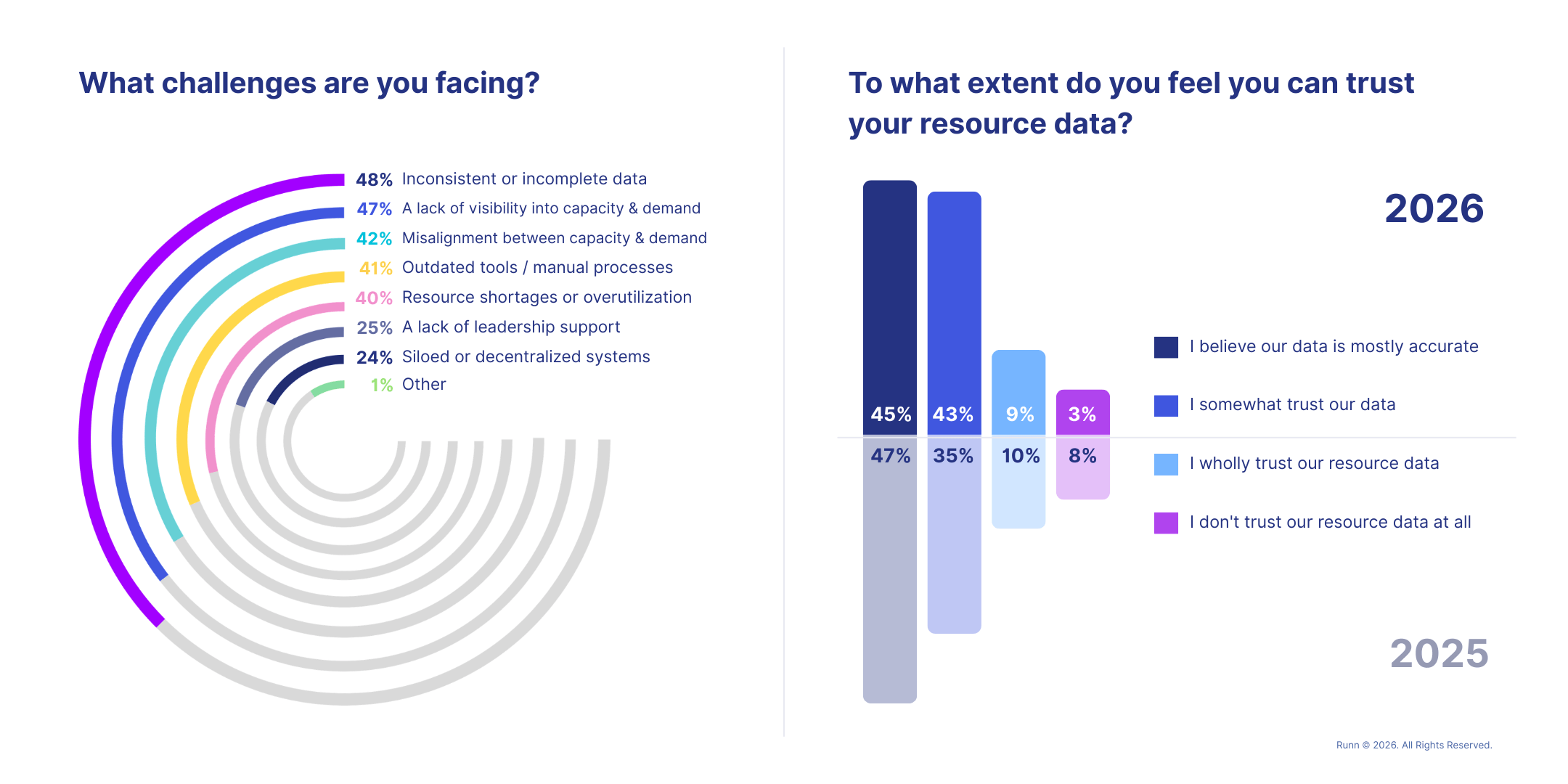
Without reliable data, resource planning becomes resource guesswork.
The first step to improving this is understanding how your people are actually spending their time, answering:
For example, a team might appear fully utilized on paper, but time tracking reveals that senior engineers are spending 30% of their week on internal meetings or support tasks. That’s high-cost capacity allocated to low-value work.
💡 No one wants to feel like Big Brother is monitoring them. Introduce time-tracking carefully as a planning tool, explaining that it is data to improve planning, reduce resource guesswork, and ultimately balance workloads – not to control them.
Once you have visibility, the next step is deciding who should work on what. This is where most optimization gains are made or lost.
Skills-based planning helps you make better use of the capability already in your team, without the trade-offs.
Job titles don’t tell the whole story. For example, assigning a generalist JavaScript developer to a complex React project might seem efficient, but a specialist could deliver the same work faster and with fewer defects. Or you might have a backend engineer with DevOps experience who could support a deployment phase, but that skill goes unused because it’s not visible.
💡 Maintain a centralized skills inventory so you can go beyond titles and quickly find people based on specific technologies, certifications, or experience. Plus, spot emerging skills gaps in time to fill them.
Not all projects are equally valuable to your business, and your resourcing decisions should reflect that.
For example, if a senior engineer is assigned to a low-margin internal project while a high-value client delivery is staffed with less experienced developers, you risk delays, rework, and reduced client satisfaction. At the same time, you’re quietly eroding your margins.
💡 Implement a project prioritization framework (e.g., revenue, strategic importance, client impact) so that your most critical work is always staffed first.
Utilization is an important part of the picture. It measures how much of your people’s time is allocated to work. The general rule is to aim for 80-85% overall utilisation, with billable utilisation at 80-85% of that. This leaves time for essential non-billable work and room for maneuver in the event of unexpected changes.
A team running at 95% utilization might look efficient on paper, but in practice, it leaves no room for change. By contrast, a team operating at 80–85% utilization has the flexibility to absorb change and the headspace to do their best work.
💡 Use weekly or monthly utilization tracking to spot trends before they become a problem. Overutilization suggests a need to redistribute tasks or even hire. Under-utilization surfaces the capacity for more work.

Resource decisions directly affect project profitability, sometimes in ways that aren’t immediately visible.
For example, assigning a senior engineer with a high billable rate to a low-margin project can quietly erode profit. On the flip side, assigning a less experienced developer to a complex, high-value project may reduce delivery costs but increase the risk of delays, rework, and client dissatisfaction.
💡 Strike the right balance by regularly reviewing project allocations against billable rates and project value to spot mismatches before they impact profitability.
Optimization isn’t just about what’s happening now – it’s about what’s coming next.
For example, if you don’t have visibility into upcoming projects, you might delay hiring, only to scramble when demand suddenly increases. Or you might have people finishing projects with no clear next assignment, leading to unplanned bench time (more on that next).
Capacity forecasting helps you answer critical questions:
💡 Use ‘what-if’ planning to model different outcomes, like what happens if a project starts earlier, runs longer, or requires different skills.
👉 Go deeper: IT Capacity Planning: The Ultimate Guide for 2026
Not all bench time is bad. But unplanned, unproductive bench time can be expensive.
If a developer finishes a project and sits unallocated for two weeks because no one has visibility into upcoming work, that’s lost revenue. If that time is planned and used to build high-demand skills, it becomes an investment in future delivery capacity.
💡 Plan bench time in advance and align it with business needs by upskilling your team or preparing for upcoming project demand.
👉 Read more: How to make the most of bench time
Once you’ve built strong resourcing processes, these practices help you scale and sustain them as your organization grows.
In multi-project environments, priorities change quickly. A high-priority client escalation may require immediate reallocation of key people.
If a critical delivery falls behind, you may need to move your most experienced engineer from a lower-priority project. Without clear visibility, this creates conflicts and delays across multiple projects.
Real-time visibility allows you to:
Optimization isn’t a one-time exercise. You’re committing to an ongoing process of aligning people, work, and priorities as conditions change.
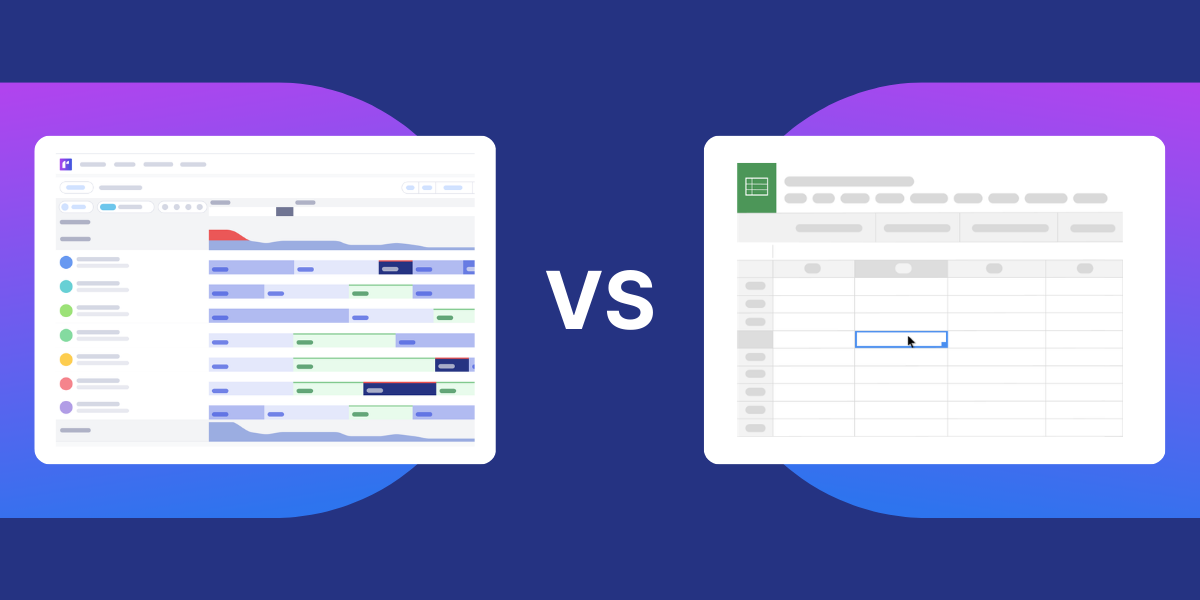
Spreadsheets might work at a small scale, but as your team and projects scale, you’ll outgrow their usefulness.
Beyond being prone to crashing, spreadsheets limit the visibility you’ve worked so hard to build. This lack of real-time visibility leads to double-booking, missed capacity, and slow decision-making.
A dedicated resource management platform provides a searchable resource inventory, drag-and-drop project plans and people allocations, automatic utilization calculations, and lots more.
👉 Uncover the five signs delivery teams have outgrown resourcing in spreadsheets
Data can tell you what’s happening. Conversations tell you why.
Talking to your team is a massively underrated strategy. You might see a developer is consistently underutilized, but without context, you won’t know whether they’re between projects, lacking the right skills, or disengaged.
The bigger you get, the harder it is to know people individually. But regular conversations can uncover hidden capabilities, career goals, or blockers. Over time, this moves you beyond reactive planning and toward a more proactive, people-centered approach to resource management.
Better IT project delivery depends on visibility, strong decision-making, and the ability to adapt quickly as delivery changes. Runn is designed to support each of these in a practical, day-to-day way.
.png)


